Track Migraines Without Typing
The easiest migraine logging method in 2026, speak your symptoms in seconds, even with your eyes closed.
Typing during a migraine is painful. Screen brightness hurts. Most people skip logging entirely, and lose the data they need to find their triggers. Migraine Trail's voice-based tracking removes all of that friction. Just speak. AI does the rest.
Try It Free on iOSFree to download · No credit card needed
Why Typing Makes Migraine Tracking Harder
The problem isn't motivation. It's that typing during an attack feels almost impossible.
Pain Makes Typing Unbearable
During a migraine, even small movements feel amplified. Holding your phone up, squinting at a screen, and tapping small buttons through throbbing head pain is a genuinely awful experience. Most people just put the phone down and never log the entry.
Screen Brightness Hurts
Photophobia, light sensitivity, affects the vast majority of migraineurs during attacks. Even at minimum brightness, a screen can be intensely uncomfortable. Any app that requires you to look at a screen mid-attack has a fundamental design flaw.
You Skip It and Lose the Data
One skipped entry becomes two. Two becomes a week. Within a month, the diary is abandoned and the trigger data that would have helped your doctor is gone. Consistent logging is only possible if logging is nearly effortless.
Common Methods People Try, and Why They Fall Short
Most methods require too much effort exactly when you have the least to give.
Paper Diaries Get Lost. Fast
A notebook feels low-friction until you're lying in a dark room and it's on the other side of the house. Paper diaries also can't analyze their own data, you're left with pages of notes and no way to find the patterns that matter.
- Easy to forget at home or at work
- Requires a pen and enough light to write
- No analysis, you have to find patterns yourself
Notes Apps Miss Critical Details
Typing a note during an attack still requires screen interaction and bright light. And unstructured notes can't be analyzed, there's no way to calculate attack frequency, find trigger correlations, or generate a doctor report from a list of text notes.
- Still requires looking at a screen and typing
- Unstructured data, no analysis possible
- Nothing useful to show your doctor
Most Apps Are Built for Calm Moments
Standard migraine apps have forms, dropdowns, and sliders, designed to be filled in comfortably at a desk. They're not designed for use mid-attack with your eyes half-closed. Most people stop using them within weeks for exactly this reason.
- Multiple taps and screens to log one entry
- Requires full screen attention and bright display
- Designed for healthy users, not suffering ones
The Better Way: Voice-Based Migraine Tracking
Instead of typing, you speak. Instead of forms, you talk naturally. AI handles everything else.
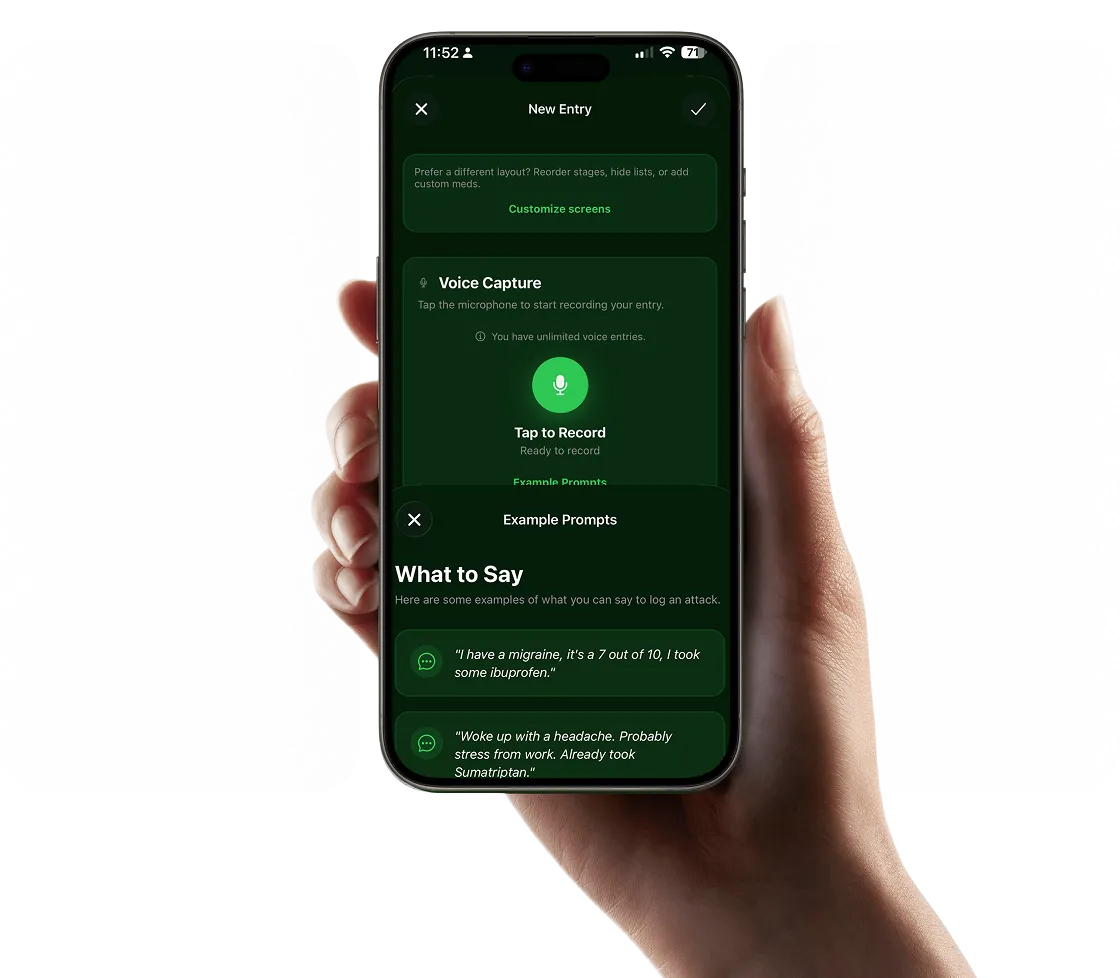
Voice-based migraine tracking works the way you actually communicate when you're not well, by speaking. You don't describe a headache to a friend by filling in dropdowns. You say "it started around noon, really bad on the left side, maybe a 7, nauseous, took sumatriptan." That's exactly what Migraine Trail's AI processes.
You tap the microphone button once, you can find it by feel without looking at the screen, and describe how you're feeling in your own words. The AI parses pain level, location, symptoms, possible triggers, and medications from your speech and structures it into a complete diary entry. It takes about 20–30 seconds. Then you put the phone down.
No screen to stare at. No fields to fill. No bright light to endure. This is what tracking migraines without typing actually looks like in practice, and it's the reason Migraine Trail users log consistently when other apps get abandoned. If you want to see how this compares to traditional methods, our easy migraine tracker app guide breaks down what makes a tracking tool actually work for chronic sufferers.
Benefits of Hands-Free Migraine Tracking
Removing typing doesn't just make logging easier, it changes what's possible with your data.
You Actually Log Every Attack
When logging takes 20 seconds and requires no screen interaction, you do it. Consistent data, even brief entries on bad days, is what makes trigger analysis possible over time.
More Detail, Less Effort
Speaking is faster than typing and captures more nuance. You can describe your pain quality, mood, energy level, and what you think might have contributed, all in a few natural sentences, without it feeling like a chore.
Better Data for Your Doctor
Consistent voice entries build a complete, structured dataset. Migraine Trail turns this into clinical PDF reports automatically, the kind of data your neurologist can actually use to make better treatment decisions.
Triggers Surface Faster
The more consistently you log, the faster AI pattern analysis works. Most users see meaningful trigger patterns within 6–8 weeks, but only if they've logged enough entries to build a reliable dataset.
How to Start Tracking Migraines Without Typing
Three steps. Takes less than two minutes to set up.
Download the App
Migraine Trail is free on iOS. Download it, create an account, and you're ready to log your first entry. No setup forms, no onboarding questionnaires to fill out.
Tap the Mic. Speak Freely
When you feel an attack coming on or during one, tap the microphone button and describe how you're feeling in plain English. Speak for 20–30 seconds. That's your entry done.
Let AI Find Your Patterns
Keep logging after each attack. After 6–8 weeks, Migraine Trail's AI surfaces your personal trigger patterns and generates a doctor-ready report from all your entries automatically.
Questions About Voice-Based Migraine Tracking
Can I really track migraines without typing anything?
Yes. Migraine Trail uses AI voice recognition so you describe your attack out loud, pain level, symptoms, potential triggers, medications, and the app structures it automatically. You don't type a single character.
How long does a voice entry take?
Most entries take 20–30 seconds. You describe how you're feeling in plain language, like you'd explain it to a friend, and AI extracts all the clinical details automatically.
Does it work in a dark room with my eyes closed?
Yes, that's exactly what it's designed for. Tap the microphone button once (you can find it by feel), speak, and you're done. No need to look at the screen.
What if I forget to log during an attack?
You can log after the fact too. Even a quick post-attack entry. 'had a bad migraine yesterday, maybe a 7, lasted about 4 hours', is valuable data. The app also sends gentle reminders to help you stay consistent.
Try a Voice-Based Migraine Tracker. Free
Stop fighting your tracking app when you're in pain. Migraine Trail is designed from the ground up to work when you feel your worst, no typing, no screens, no friction.
Download Free on iOSAlso see: Easy Migraine Tracker App · Migraine Tracking with AI