The Easy Migraine Tracker App Built for Attacks, Not Admin
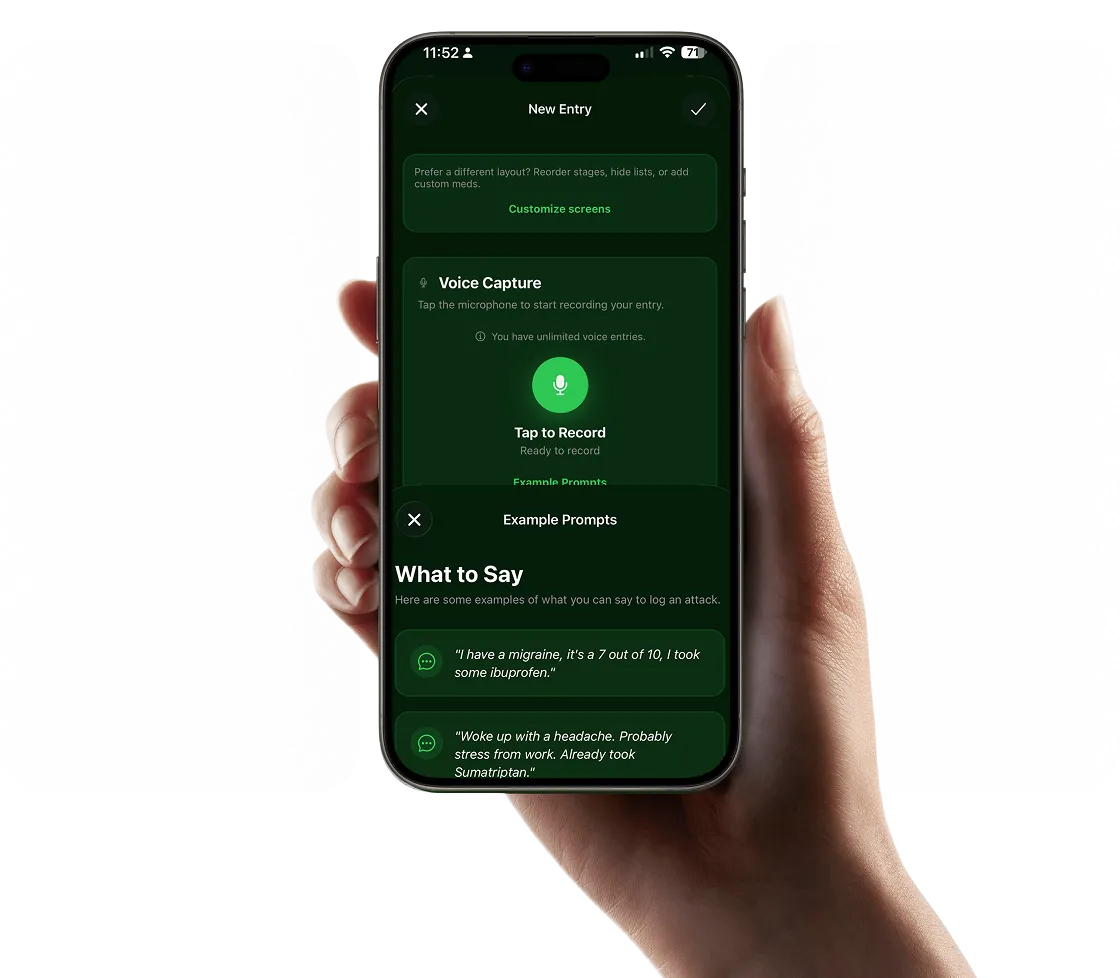
Log a complete migraine entry in under 30 seconds, no forms, no menus, no typing required.
Most tracking apps fail the moment you need them most. Migraine Trail is the easy migraine tracker that works when you're suffering, voice-first, screen-free, and done before you reach for a pillow.
Start Tracking FreeFree on iOS · No credit card required
Why Most Migraine Tracker Apps Are Too Hard to Use
The problem isn't willpower, it's design. Apps built like medical forms collapse when you're actually suffering.
Form-First Design
Sliders, dropdowns, checkboxes, long symptom lists, these require mental clarity and fine motor control. During an active migraine with photophobia and nausea, filling out a form is the last thing you can manage. Most apps are designed for when you're well, not when you're sick.
Too Many Required Fields
Apps that require you to fill in every field before saving teach one behavior: avoidance. If logging feels like work, you'll log during mild headaches and skip during severe attacks, eliminating the most important data from your history entirely.
Screen Brightness as a Barrier
Photophobia affects over 80% of people during a migraine attack. Any app that requires you to read menus, tap through settings, or squint at a bright screen has already failed the most common symptom of the condition it's meant to track.
What an Easy Migraine Tracker Actually Looks Like
Three features separate an app you'll actually use from one you'll delete in a week.
Speak Naturally. AI Does the Rest.
Tap once and speak: "Pretty bad migraine, maybe a 7. Took sumatriptan an hour ago, not sure if it's working. Pulsing on the right side, some nausea." That's a complete clinical entry, pain scale, medication log, symptom profile, captured in 20 seconds without touching a single form field.
- Works with your eyes closed in total darkness
- No minimum requirements, even a 10-second note counts
- AI structures your speech into searchable, analyzable data
Fast Enough to Actually Use During an Attack
The benchmark for a usable migraine tracker is the 30-second rule: if logging takes longer than 30 seconds from unlock to saved entry, most people will skip it during moderate-to-severe attacks. Migraine Trail consistently achieves 15–25 seconds from app open to completed entry, with no required fields.
- 15–25 second average entry time
- No mandatory fields, minimum entry is one sentence
- Weather and timestamp captured automatically
Insights Without the Spreadsheet Work
Easy logging is only half the equation. The other half is getting value from what you logged without having to analyze it yourself. Migraine Trail automatically surfaces trigger correlations, tracks medication patterns, and builds a personal risk profile from your entries, no manual review required.
- Trigger patterns identified automatically over time
- Medication effectiveness tracked per attack
- Doctor-ready PDF generated with one tap
Why Simplicity Is the Most Important Feature in a Migraine App
What "easy" really means when you're tracking a neurological condition.
The migraine app market is crowded with apps that claim to be simple. Most of them are simple compared to electronic health records, not simple for someone in the middle of a severe attack with photophobia and cognitive fog. Real simplicity means designing for your worst moments, not your best ones.
The challenge is that migraine attacks affect the very cognitive functions that most apps rely on: reading comprehension, fine motor control, decision-making, and tolerance for screen brightness. An app that's perfectly usable when you're healthy, with its toggle switches, radio buttons, and multi-step workflows, becomes genuinely inaccessible during a grade 3 attack. This is why the average person abandons their migraine tracking app within two to three weeks. Not because they stopped caring, but because the app stopped being usable.
What Consistent Logging Actually Requires
Migraine researchers have identified two main predictors of long-term tracking compliance: entry time and required fields. Apps that can be completed in under 60 seconds show dramatically higher 90-day retention than apps requiring 2+ minutes. Apps with zero required fields show higher completion rates during severe attacks than apps requiring even a single mandatory input. The ideal migraine tracker, from a compliance standpoint, requires one action: speak one sentence. Everything else is optional.
This is the design principle behind Migraine Trail. The voice logging feature was not built as a convenience add-on, it is the primary interaction model. Tracking migraines without typing isn't a niche use case. It's the only realistic way to maintain consistent logs during an active attack, which is when the data is most clinically valuable.
Who Benefits Most from a Simple Migraine Tracker
Easy migraine tracking benefits everyone, but it's particularly important for specific groups. People with chronic migraine (15+ days per month) need to log frequently, simplicity isn't a luxury, it's what makes the difference between a complete clinical picture and a spotty one. People new to tracking often abandon complex apps before seeing any benefit; a low-friction entry point builds the habit before adding complexity. People who experience severe photophobia, nausea, or cognitive fog during attacks can't rely on apps that require screen interaction. And people who've tried tracking before and given up often find that the problem was the app, not them.
The Easy Migraine Tracker for Every Type of Sufferer
Whether you've never tracked before or tried other apps and quit, Migraine Trail is designed to fit.
First-Time Trackers
No learning curve. Download, tap, speak. Your first entry is complete before you've read any instructions. Start with a voice note and build from there at your own pace.
Previous App Abandoners
If you've tried other apps and stopped, it probably wasn't your fault. Form-heavy apps fail during attacks. Migraine Trail's one-tap voice logging is a different approach entirely, try it during your next attack and see the difference.
Chronic Migraine Sufferers
When you're logging 15+ times a month, friction compounds. A 2-minute form 15 times is 30 minutes of pain-state admin. A 30-second voice note 15 times is 7 minutes. The difference in compliance rates over 6 months is significant.
Severe Attack Sufferers
Photophobia, nausea, and cognitive fog are the norm for many migraineurs. Migraine Trail is the rare app designed to work in a darkened room with one hand while lying down, because that's the reality of the condition.
Easy Migraine Tracker App Questions
What makes a migraine tracker app actually easy to use?
Ease of use during a migraine is completely different from ease of use when you're healthy. A truly easy migraine tracker lets you log without looking at the screen, without navigating menus, and without reading fine print. The gold standard is voice logging, one tap, speak naturally, done in 30 seconds. Anything requiring more steps than that will be abandoned when you're most symptomatic.
Why do most migraine apps feel complicated?
Most migraine apps were designed like healthcare forms, long checklists, dropdown menus, scales and sliders for every symptom category. They capture a lot of data in theory, but they assume you have the mental clarity and pain tolerance to fill out a detailed form during an active attack. In practice, this means most people stop logging when attacks are worst, right when the data matters most.
Can a simple app still give me useful insights?
Yes, and the insight quality of a simple app is often better than a complex one, because you actually use it consistently. A complete record of 50 attacks logged with 5 data points each is far more analytically useful than 12 partially completed entries with 30 fields. Migraine Trail uses AI to extract maximum information from minimal input, a 20-second voice note can contain everything needed for trigger analysis and medication tracking.
Is Migraine Trail suitable for people who aren't tech-savvy?
Yes. The app was specifically designed so that the primary logging method, voice, requires zero technical knowledge. You tap one button, speak as you normally would, and the AI handles everything. There's no account setup required to try it, no forms to fill out, and the first log entry takes about 30 seconds from download.
Try the Easiest Migraine Tracker App. Free on iOS
One tap. Speak naturally. Done. Download Migraine Trail and log your first entry in under 30 seconds.
Download Free on iOSRelated: Track Without Typing · Migraine Tracker App